
NITComply is NDIS invoicing software that turns the work your team has already recorded into invoices. Bulk invoice from shifts, progress notes or coordination activities, prepare an NDIA bulk payment request file, and sync invoices to Xero.
Invoicing often means copying the same details twice. For example, shifts, notes and coordination time are recorded in one place. Then someone types them into an invoice or a claim file by hand.
As a result, each extra step adds time and room for error. Instead, NITComply invoicing starts from the records you already keep, so your team checks the result instead of rebuilding it.
Create invoices from shifts, progress notes or coordination activities instead of typing them again.
Save the NDIS support items you bill often, with their item number, description and rate.
Download a CSV file in the NDIA myplace bulk upload format for the dates you choose.
See how many invoices are draft, sent, paid or overdue, and search your invoice history.
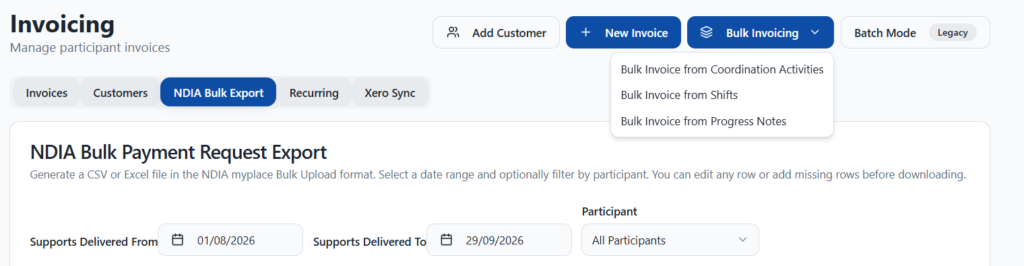
NITComply has three bulk invoicing options: from shifts, from progress notes and from coordination activities. First, pick the one that matches how you deliver the support. Invoices are then created from those records, so you don’t enter the same hours twice. However, you can still create a single invoice for one participant when you need to.
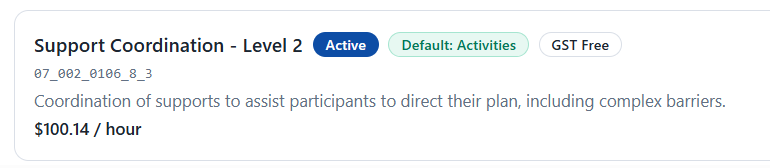
A billing preset is a saved shortcut for a support item, such as Support Coordination Level 2. First, you pick it from the NDIS catalogue or enter custom details, and it keeps the item number, description, rate and GST setting. Presets are also saved for your whole organisation. In addition, you can set where each one applies by default, or attach presets to one participant from their Budgets tab. Later, on the bulk invoice screen, each participant row has a preset list, so you can switch the item before invoices are created. Meanwhile, your shifts and activities are not changed, and existing invoices are not affected if you later edit or delete a preset.
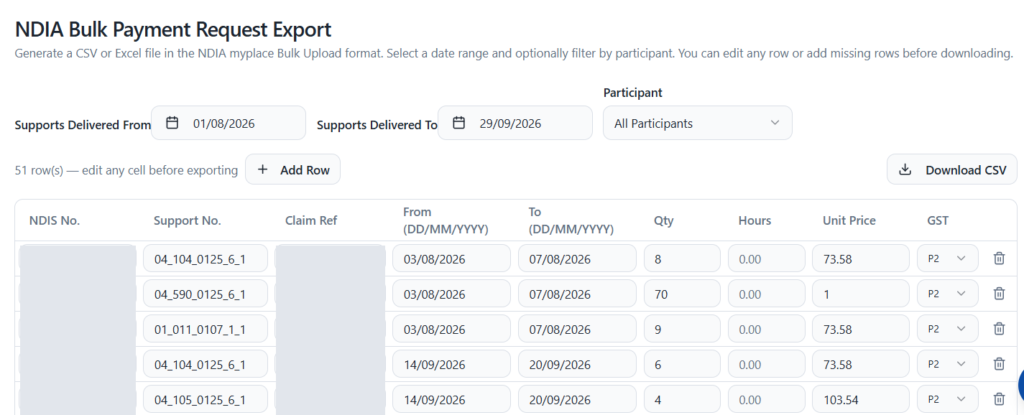
For NDIA-managed participants, NITComply builds a bulk payment request file in the NDIA myplace bulk upload format. First, choose the dates the supports were delivered and, if you like, one participant. Each row shows the NDIS number, support item number, claim reference, dates, quantity, hours, unit price and GST code. After that, you can edit any cell or add a missing row, then download the CSV.
The Invoicing page shows your total invoices and how many are draft, sent, paid or overdue. Your invoice history lists each invoice with its customer, participant, dates, status and amount. Customers can be plan managers or the NDIA. You can also add new customers and set up recurring invoices.
Save the support items you bill most often from the NDIS catalogue.
Next, your team records shifts, progress notes and coordination activities as usual.
Then choose a bulk invoicing option, check the presets on each row, and create the invoices.
Finally, download the NDIA bulk upload file for NDIA-managed participants, and sync invoices to Xero.
NITComply connects to Xero accounting. An admin connects your Xero organisation from Settings, under Connect Tools. Once connected, invoices and contacts sync with Xero, and the Xero Sync tab on the Invoicing page shows whether any sync has failed. For now, Xero is the only connection available today.
Yes. You can bulk invoice from shifts, from progress notes or from coordination activities.
NITComply prepares a CSV file in the NDIA myplace bulk upload format. You can edit rows before you download it, then upload it to myplace yourself.
Yes. Once your Xero organisation is connected, invoices and contacts sync with Xero.
Nothing. Existing invoices are never affected if you later edit or delete a preset.
Book a demo and we'll show you how NITComply invoicing, NDIA bulk claims and Xero sync would work for your services.